
What does an AI retention marketer actually do?
The same job as the person who runs your email and SMS. It notices what's worth sending, picks who gets it, makes it, and hands it to you to approve. Here's a real week of it.
It's software that runs your retention program the way a hire would. The difference from an email tool: it starts the work itself, and nothing goes out until you say yes.
Six things happen every week. Most email tools do one of them.
Retention marketing is getting people who already bought, or already signed up, to buy again. For most stores that's email and SMS: campaigns that go to a group on a set day, and journeys that run for one person after they do something, like leaving a cart.
Here's the loop, with examples from Brooklyn Film Camera, a New York shop that restores vintage cameras and has run on Ripple since 2025.
- 1
Notice what's worth sending
It starts from what's happening in the store, not a blank calendar: a restock, new arrivals, a group that's gone quiet.
A restored one-of-one camera comes back from the techs. Ripple writes a low-stock note to the few people who looked at it. One send went to a single subscriber. He bought the camera.
- 2
Decide who it's for
It builds the audience from store behavior and holds back people who were just emailed or already bought.
The owner's standing rules: never pitch instant film to 35mm shooters, and repair customers get no marketing at all.
- 3
Make it
It writes and designs the email in your voice, with your real products and photos.
Cameras earn 50–60% margin and film earns 11–12%, so cameras get the marketing muscle. No AI imagery, ever.
- 4
Check it, then hand it to you
Links, layout, product data and any discount code get checked before you're asked to look. Then you approve it, change it, or send it back.
- 5
Explain the call
Ask "why this audience?" or "why no discount?" and you get a plain answer, not a dashboard.
- 6
Learn from what happened
Results feed the next plan.
A narrow camera spotlight set the account's best click rate ever, and journeys out-click campaigns about 2.8 to 1. The plan shifted toward both.
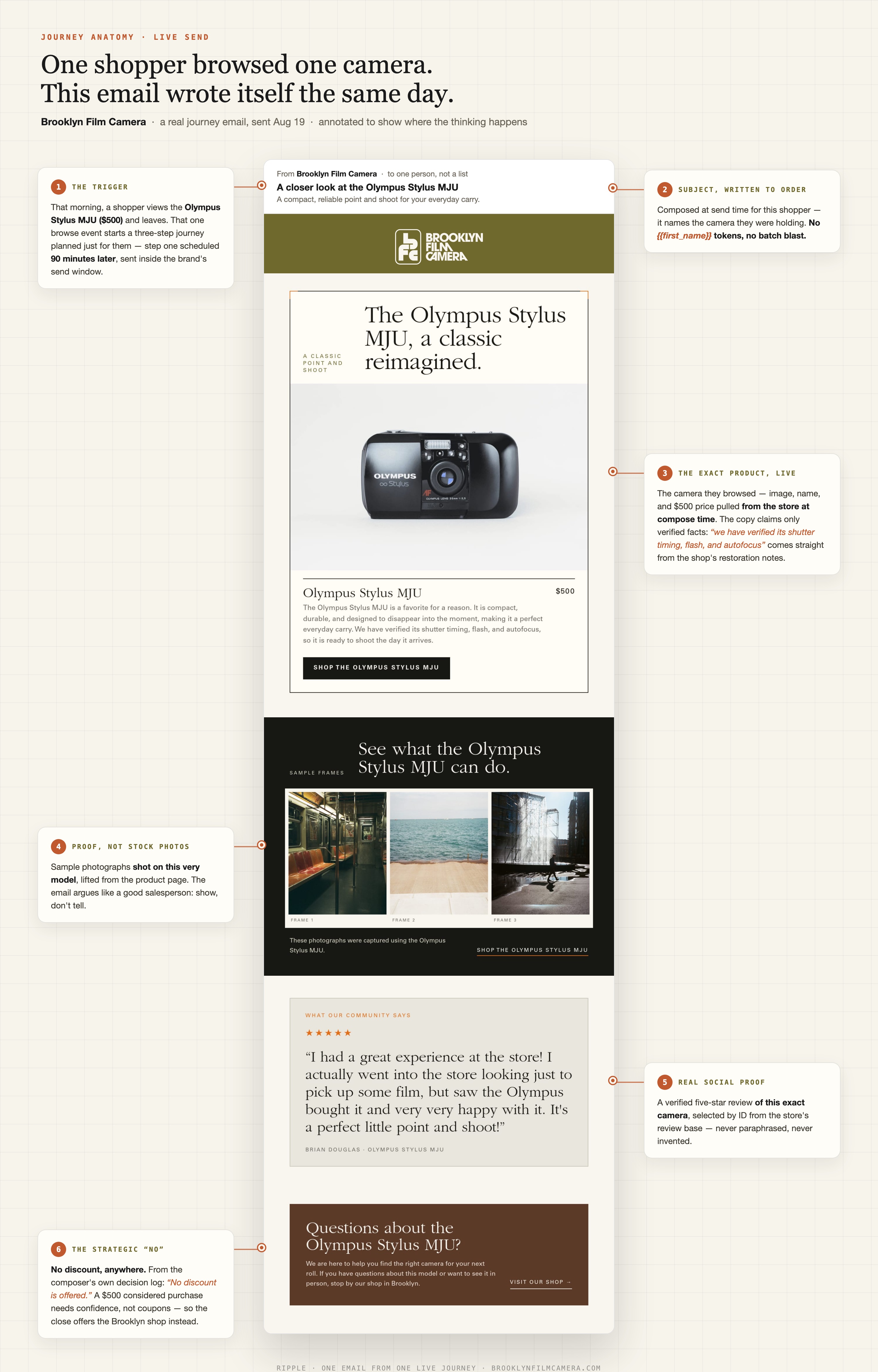
One shopper browsed one camera. This email went out the same day.
This is a real journey email from August, annotated. A shopper looked at a $500 Olympus Stylus MJU and left. Ripple picked the camera they were looking at, pulled sample photos shot on that model and a verified review of it, and left out the discount on purpose.
You can ask it why. It has to have a reason.
A hire can explain their thinking. A subject-line generator can't. Here's the kind of exchange an owner has about the email above.
Written for this post from the email's decision log, which reads: "No discount is offered."
Your email platform's AI helps with a step. This does the job.
An AI feature inside Klaviyo or another platform writes a subject line, a block of copy, maybe a segment. Someone still has to notice the opportunity and put the send together. Ripple works with your platform rather than replacing it.
| Part of the job | Platform AI featuresKlaviyo and similar | A retention hireFull-time or freelance | RippleAI retention marketer |
|---|---|---|---|
| Notices what's worth sending | NoWaits for you to start | YesWhen they have time | YesFrom live store data, daily |
| Builds the audience | PartlySuggests segments | Yes | YesWith your exclusion rules |
| Writes and designs the email | PartlyOne block at a time | Yes | YesWhole email, your real products |
| Checks it before you see it | No | Yes | YesLinks, layout, codes |
| Explains its reasoning | No | Yes | YesAsk anytime |
| Who approves the send | You | You, or they just send it | You, every time |
Two stores, before and after.
Brooklyn Film Camera
Email's share of online revenue
About 5× the best month before Ripple. Most of this shop's sales happen at the counter, so the online share is a floor.
CeilingSAM
Email's share of total revenue
Started with only about 1,000 of 41,000 contacts reachable. Peaked at 46% in one month.
Both bars use the same scale, 0 to 40%. Read the full case studies →
The calls that need taste stay with you.
You decide
- What the brand stands for and how it sounds
- Which offers you're willing to run, and which you never will
- Whether each email is good enough to go out
Ripple does
- Watches the store and finds the next send
- Builds the audience and the email
- Checks it, explains it, and learns from the results
Stores that know email should earn more, and don't have anyone to run it.
That's usually no marketer at all, or one person stretched across every channel. Brooklyn Film Camera's owner had every opinion a program needs and no hours to run it. He spent months turning those opinions into rules Ripple follows on every email.
"We need the copy to sound like it was written by a human being."
Owner, Brooklyn Film Camera, on the first rule he set
Questions people ask
Does it send emails without my approval?
No. Every campaign comes to you first. You can approve it, ask for changes, or ask how it made a decision.
Does it replace Shopify or Klaviyo?
No. Ripple reads products, orders and customer behavior from Shopify, and sends through the email platform you already use, such as Klaviyo.
How long does setup take?
About two hours after you install it. Then you can talk to it like a new hire, and nothing goes out until you say so.
See what it would send for your store.
Install it free, connect your store, and ask it what it would do this week. Nothing publishes without you.